Get the link to change the password

E-mail *

Send
Give up
logo
022 822 024

Assistment and Call Center

New account

New account

First name *
The field will be filled with letters (A to Z), who will be reflected at articles and comments
Last name *
The field will be filled with letters (A to Z), who will be reflected at articles and comments
Login *
The field will be filled with letters (A to Z) and/or numbers, without free spaces. Can be used the symbols, except the symbol _
E-mail *
The field will be completed with un valid e-mail. To this e-mail will be sent the confirmation link about the registred user account
Password *
The password will be contain at 5 to 15 characters and will be different for the date indicated at the login, name and firstname

Repeat password *

Cancel
Sign in

Sign in

Sign in can be to do with e-mail adresss or login

E-mail/Login *

Password *

Sig in with your Google account
MPass authentication
Cancel

Get the link to change the password

E-mail *

Send
Give up
EN
  • RO
  • RU
  • EN
RORUEN
logo
About usDailyThe expert position Related sectionAccounting sectorServices13Info-video

PP „Monitorul Fiscal FISC.MD”

MD-2005, Kishinev
Constantin Tanase street, no. 6
Inside „Fertilitatea-Chișinău” Corporation., 3-th floor, office 320

Antechamber:

022 822 024

E-mail:

secretariat@monitor.tax

Support and Contact Center:

022 822 024

You want to obtain an operative and complex answer?

Send your question and obtain the answer from the experts in the shortest time, at your e-mail or published in the compartment „Questions and answers”

Ask us a question

Ask us a question

You want to obtain an answer or you will can to suggest as an article necessary for your work process? Sign in on the page, send your question or suggest and obtain the answer from the experts in the shortest time, at your e-mail or published in the compartment „Questions and answers”.

E-mail: *

Message *
Message
0/500
Cancel the message
ArhivaFrequent questionsTerms and conditions of use of the page Privacy policyInstrucțiuni pentru ștergerea contului

Subscription at Newsline

facebooktwitterlinkedintelegraminstagramgoogle
Amex logoMAIB logoMasterCard logoVisa logo

Site version: 1.0

Copyright 2021

All riths on the page monitorul.fisc.md belongs P.P. „Monitorul Fiscal FISC.MD”. Full or partial reproduction about informations or illustrations in either compartment is possible only with the written consent of the publication. Intellectual piracy is punishable by law.

icon

Feedback

To monitor the status of sent Feedback, initial we recommend to you to do sign in on the page. So, the answer at PP „Monitorul Fiscal FISC.md” at feedback will be save and will be displayed in your personal profile. If the feedback is sent an you aren't authentificated on the page, the message will be sent tot your e-mail.

E-mail: *

Message *
Message
0/500
Cancel the message
iconiconicon
icon
Facebook iconTwitter iconLinkedIn iconTelegram iconVK icon
icon
  • Home page
  • Related section
  • Electronic services
  • Documentul electronic: crearea, semnarea, verificarea autenticității semnăturii
Article image

Electronic services

Documentul electronic: crearea, semnarea, verificarea autenticității semnăturii

Circulația documentelor electronice în RM a avansat semnificativ în ultimii ani și dacă inițial documentele electronice se creau, semnau și expediau către autoritățile publice prin intermediul sistemelor informaționale automatizate, la momentul actual documentul electronic semnat cu semnătură electronică se utilizează în diferite sfere de activitate a contribuabililor, cum ar fi acte de predare-primire, contracte, corespondența dintre partenerii de afaceri, dintre contribuabili și autoritățile publice etc.
 
Majoritatea contribuabililor dețin semnătură electronică avansată calificată obținută pentru raportarea automatizată către SFS, CNAS, CNAM etc., pentru utilizarea tuturor serviciilor electronice prestate de către autoritățile publice din RM și, prin urmare, implementează procesul de circulație a documentelor electronice în toate domeniile posibile pentru a optimiza resursele umane, de timp, materiale etc.


Cu toate acestea, din diferite motive, obiective și subiective, nu toți contribuabilii utilizează documentul electronic. Astăzi începem publicarea unui set de articole ce vin în sprijinul persoanelor ce preconizează (sau sunt obligate) să implementeze acest tip de documente și ]npreun[ vom parcurge primii 7 pași.


Partea 1. Transformarea documentului din format Word sau Excel în format PDF


Pentru semnarea unui document electronic este necesar inițial de a asigura transformarea acestuia din format Word sau Excel în format PDF – o procedură simplă și care nu necesită aplicații suplimentare, decât cele instalate în calculator de Microsoft Office (adică Word, Excel, PDF). Important este faptul că opțiunea de convertire a documentului în formatul PDF există doar de la versiunea Microsoft Office 10 și mai nou. Pentru versiuni mai vechi, va fi necesar descărcarea aplicațiilor adiționale sau identificarea acestora cu utilizarea online.


Pașii de transformare a documentului electronic dintr-un format în altul sunt următorii:

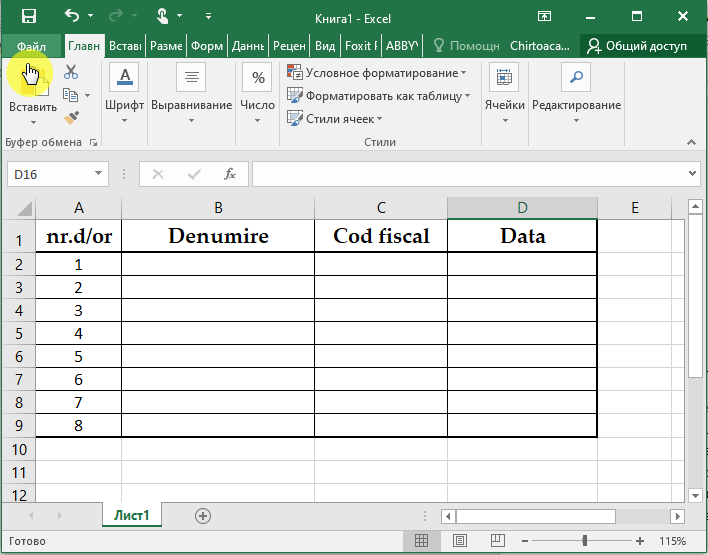
  1. crearea documentului electronic în Word sau Excel;
  2. salvarea documentului în formatul creat. Metoda de salvare a unui fișier în calculator nu va fi descrisă, fiind deja cunoscută de majoritatea utilizatorilor de calculator;
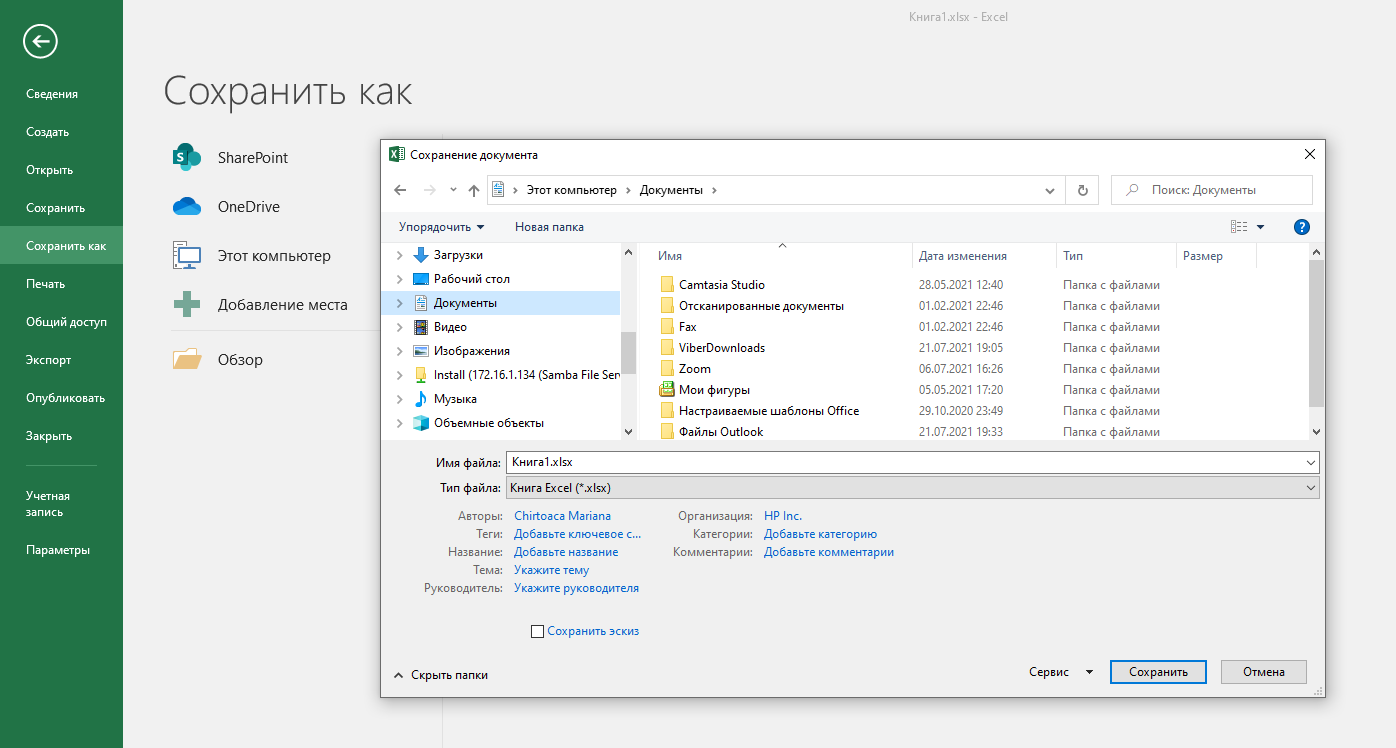
  3. accesarea opțiunii „Fișier” („Файл”), apoi „Salvare ca” („Сохранить как”), din același fișier deschis în Word sau Excel.

4.  Indicarea mapei în care se va salva fișierul pe calculator.
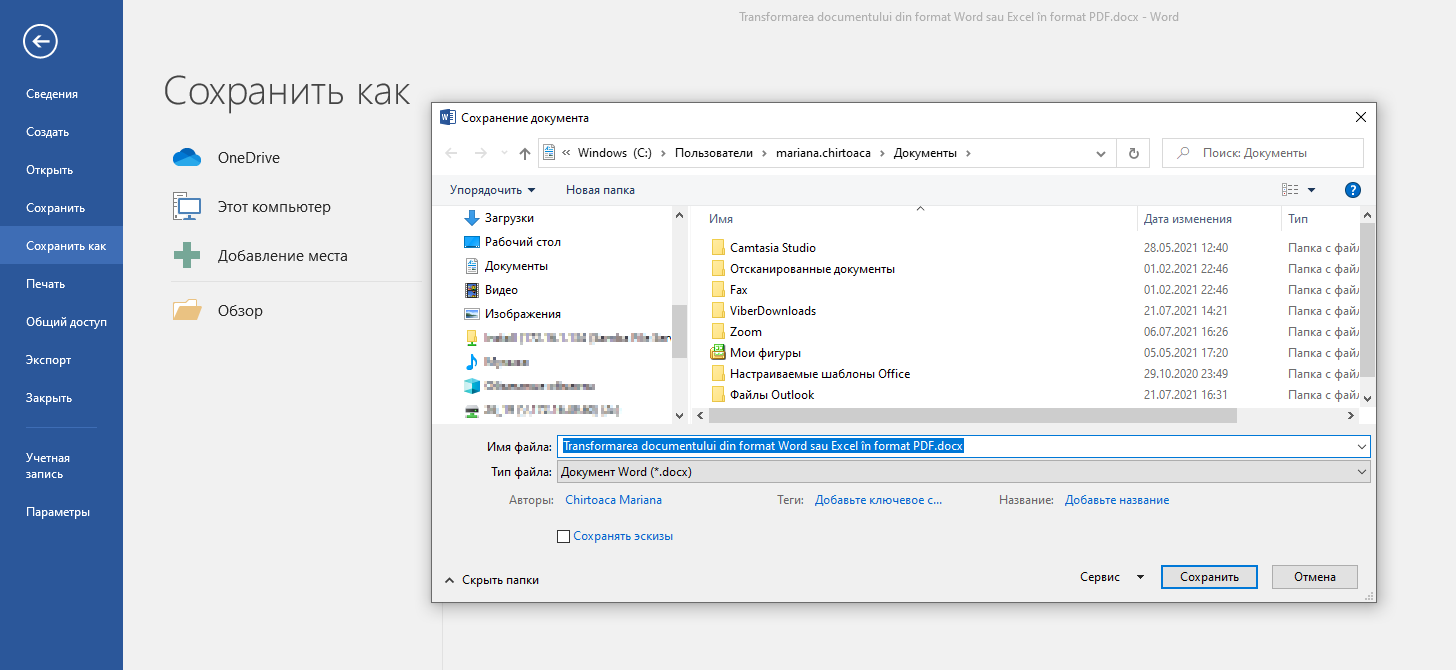
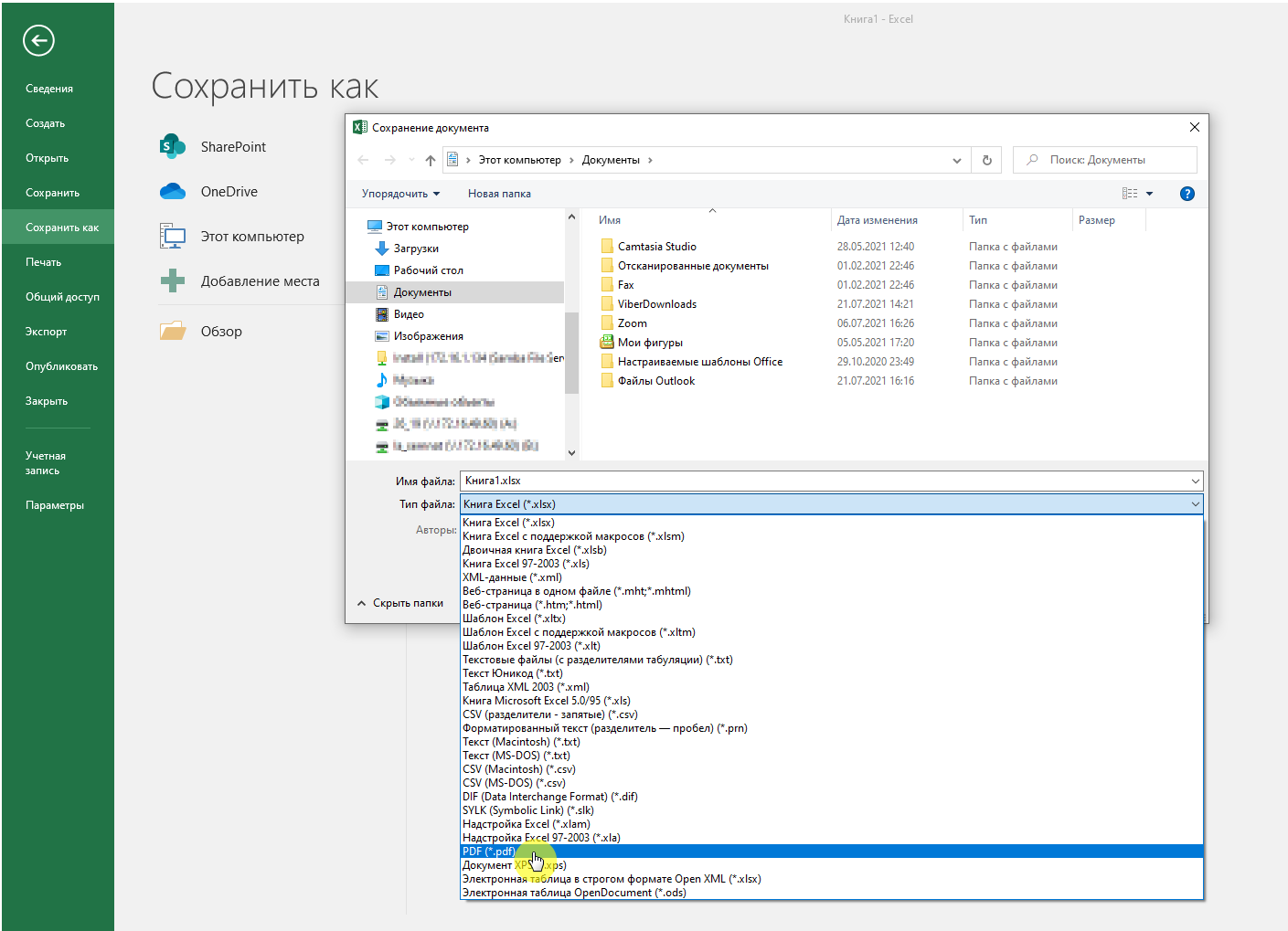
5. Selectarea formatului PDF din celula „Tipul fișierului” („Тип файла”).
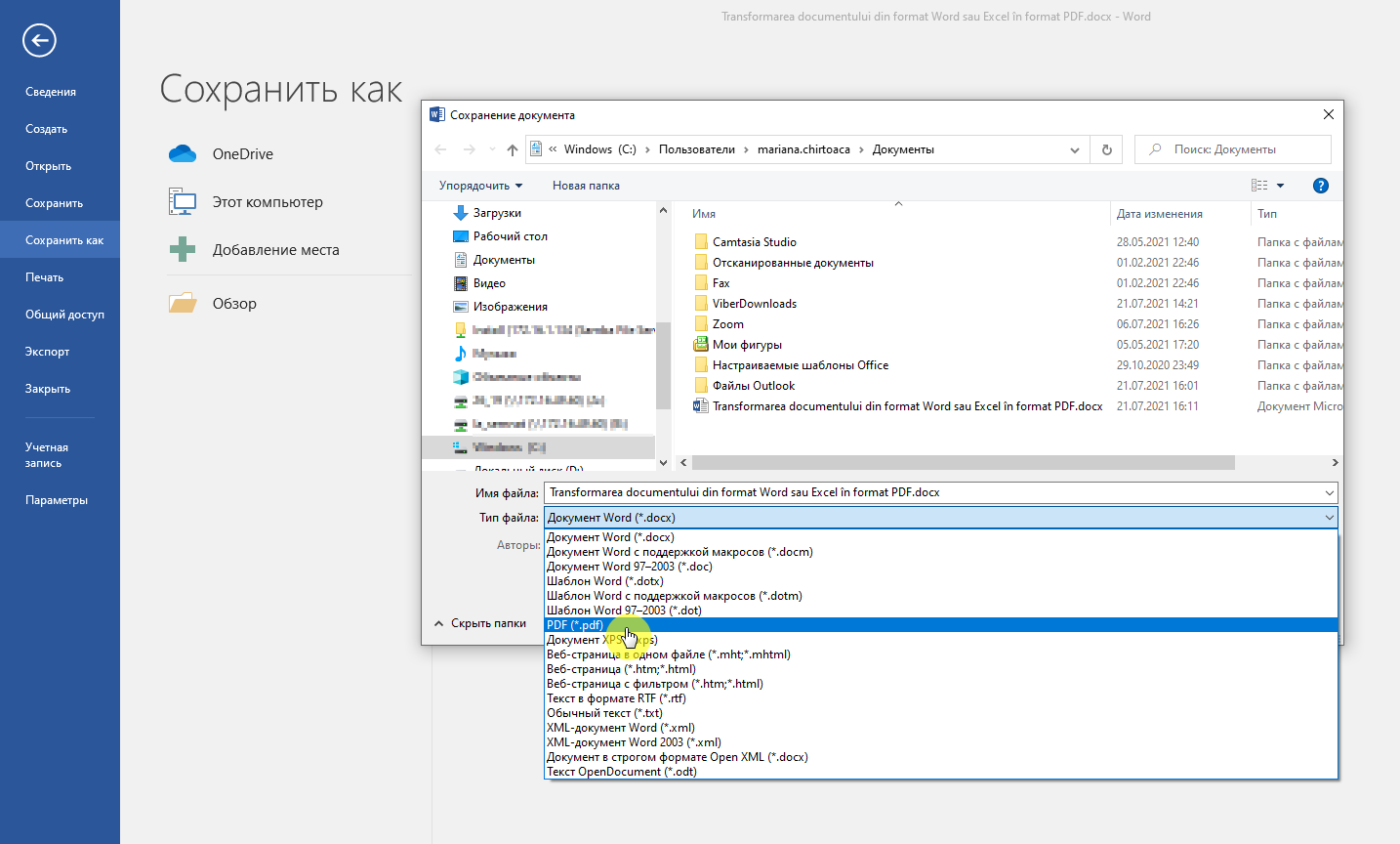
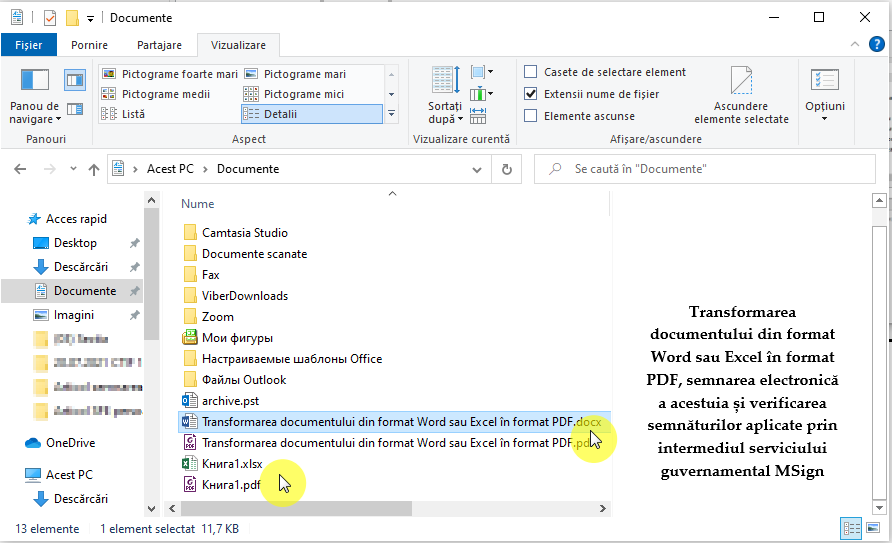
6. Accesarea opțiunii „Salvează” („Сохранить”), pentru salvarea fișierului în format În procesul de salvare a fișierului în format PDF se va deschide aceeași mapă în care s-a salvat anterior fișierul în format Word sau Excel. Se recomandă de a nu modifica denumirea fișierului și mapa în care se va salva, pentru identificarea rapidă a acestuia.
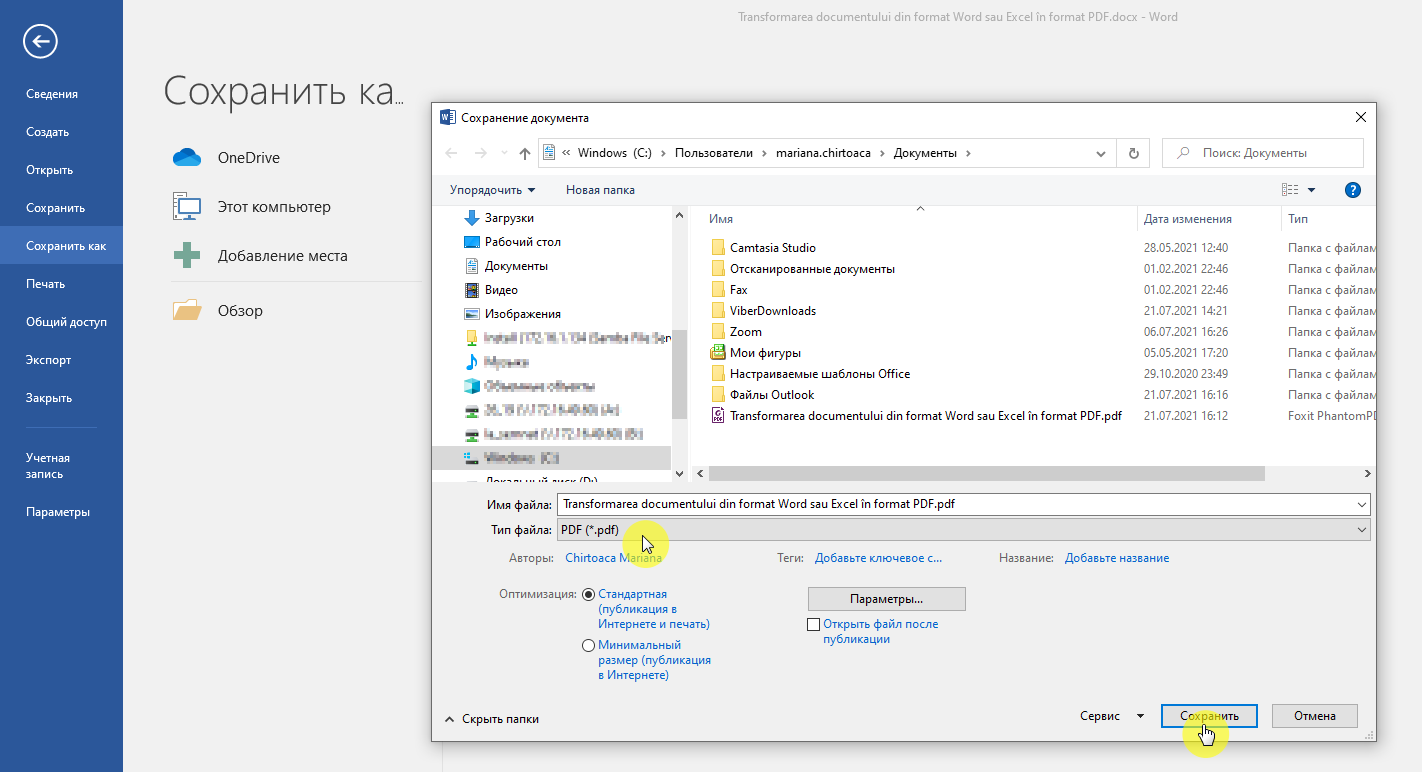
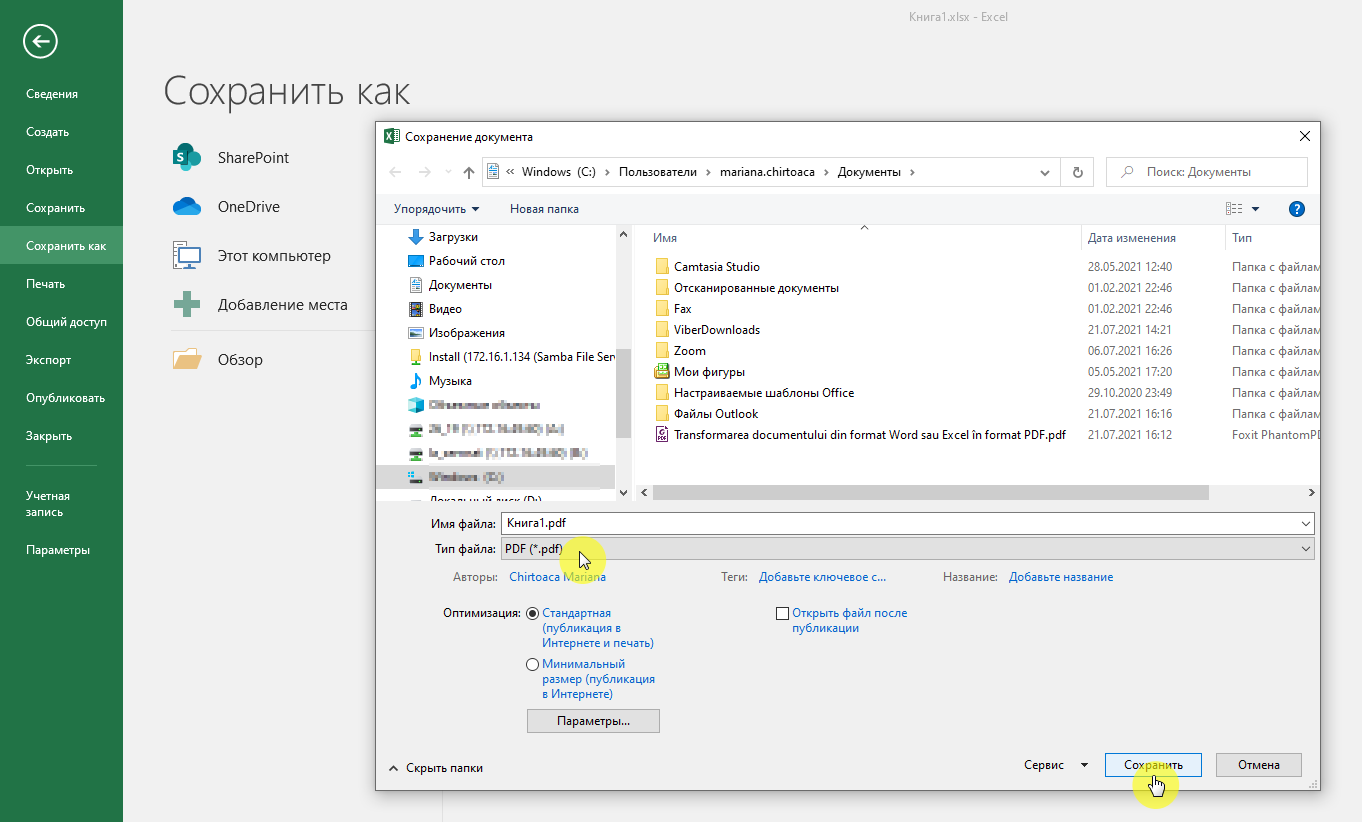
7. Astfel, se vor forma două fișiere, cu aceeași denumire – unul în format Word sau Excel, altul – în format PDF.
Va urma.

Mariana Chirtoacă

Mariana Chirtoacă

Institutions:

Publicaţia periodică "Monitorul Fiscal FISC.MD"

„Acest articol aparține exclusiv P.P. „Monitorul fiscal FISC.md” și este protejat de Legea privind drepturile de autor.
Orice preluare a conținutului se face doar cu indicarea SURSEI și cu LINK ACTIV către pagina articolului”.

3
dna1s7k9v2.png

2620 views

The date of publishing:

27 July /2021 08:00

Catalogul tematic

Noutăți

0 comments

Only users registered

New account

First name *
The field will be filled with letters (A to Z), who will be reflected at articles and comments
Last name *
The field will be filled with letters (A to Z), who will be reflected at articles and comments
Login *
The field will be filled with letters (A to Z) and/or numbers, without free spaces. Can be used the symbols, except the symbol _
E-mail *
The field will be completed with un valid e-mail. To this e-mail will be sent the confirmation link about the registred user account
Password *
The password will be contain at 5 to 15 characters and will be different for the date indicated at the login, name and firstname

Repeat password *

Cancel
and autorized

Sign in

Sign in can be to do with e-mail adresss or login

E-mail/Login *

Password *

Sig in with your Google account
MPass authentication
Cancel

Get the link to change the password

E-mail *

Send
Give up
they have the right to post comments.